The Logitech G102 Lightsync sits comfortably in the budget gaming mouse category, offering a blend of simplicity and performance that appeals to both new and casual gamers. What it lacks in premium bells and whistles, it makes up for with reliable performance and thoughtful design — especially when you consider its price point.
Design and Build
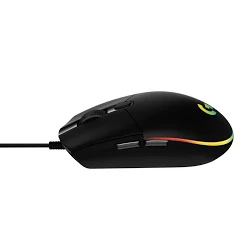
At first glance, the G102 Lightsync holds a clean and minimalistic design that feels familiar to anyone who has used Logitech’s peripherals before. The mouse is lightweight and compact, which makes it easy to slide around during long gaming sessions or everyday use. Its symmetrical shape also makes it comfortable for right-handed users in particular.
Buttons and Features
This mouse comes equipped with six programmable buttons that you can customise using Logitech’s G HUB software. Even though there aren’t extra buttons for left-hand use, the ones it does have are well placed and easy to reach without accidentally triggering them.
One handy feature is the onboard memory. That means once you set up your preferred button layout and lighting configurations, the mouse remembers them — even if you plug it into a different computer.
Performance
While Logitech doesn’t specify the exact sensor model it uses in this mouse, the tracking performance feels solid for the price. With a polling rate of up to 1000 Hz and adjustable DPI settings, the mouse responds quickly and accurately in a variety of game types — from shooters to MOBAs.
The RGB lighting adds a bit of visual style, letting you choose from a range of colours and effects via the software. It doesn’t change how the mouse feels to use, but it does give it a more personalised touch compared with plain wired mice.
Final Verdict
The Logitech G102 Lightsync is a strong contender in the budget gaming mouse segment. It doesn’t try to over-impress with unnecessary features, but it delivers dependable performance, customisation options, and a comfortable design that suits a wide range of gamers. For those seeking a capable gaming mouse without spending a lot, it’s tough to go wrong here.