
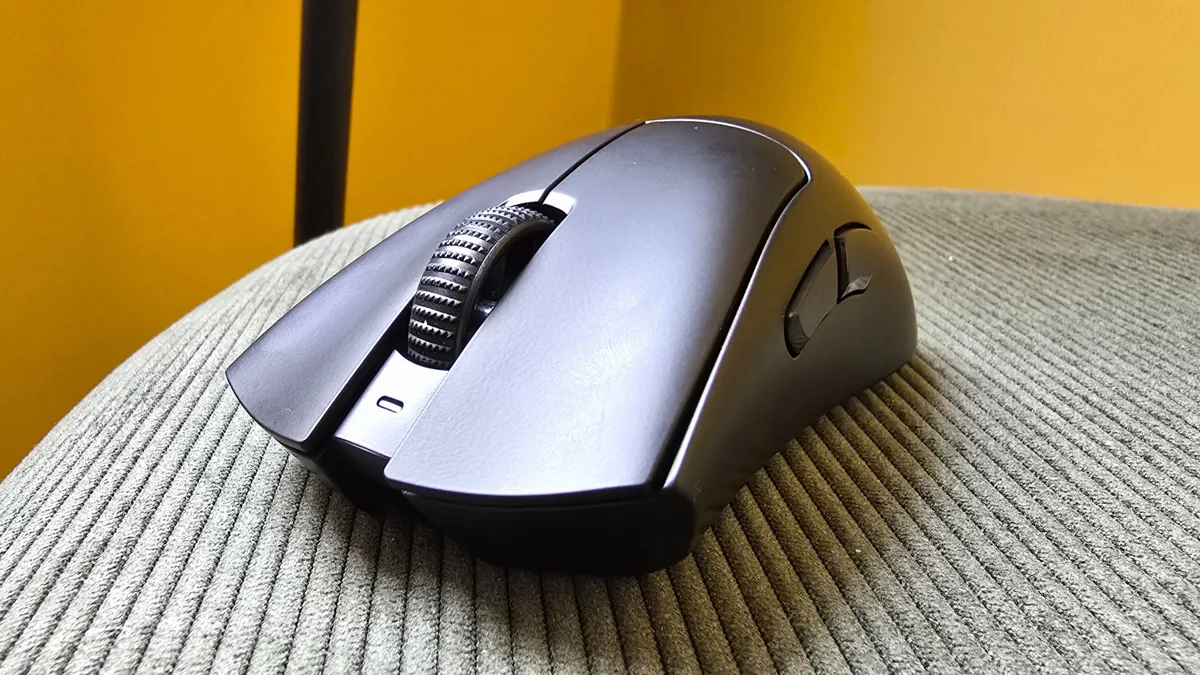
Razer didn’t settle for a routine upgrade with the DeathAdder V4 Pro. Instead, it rebuilt its flagship esports mouse from the ground up—preserving its signature ergonomic design while enhancing virtually every other component. With a new top-tier sensor, optical switches, and an 8,000Hz polling dongle, this is a next-gen device at a premium price point.
Pros
- Exceptionally fast tracking (900 IPS, 45,000 DPI)
- Comfortable, ergonomic design
- Thoughtfully placed, tactile side buttons
- Smart sensor customization via Synapse
- Long battery life for competitive play
Cons
- Loud, hollow-sounding clicks
- DPI button positioned on the underside
Price & Specs
| Feature | Details |
|---|---|
| Price | $169.99 / £169.99 |
| Connection | 2.4GHz wireless / Wired (USB-C) |
| Weight | 56g |
| Buttons | 6 (incl. 2 side buttons) |
| DPI | 45,000 |
| IPS | 900 |
| Switches | Razer Optical Mouse Switches Gen 4 |
| Battery Life | Up to 150 hrs @1,000Hz / 22 hrs @8,000Hz |
| Sensor | Razer Focus Pro 45K |
Design & Comfort
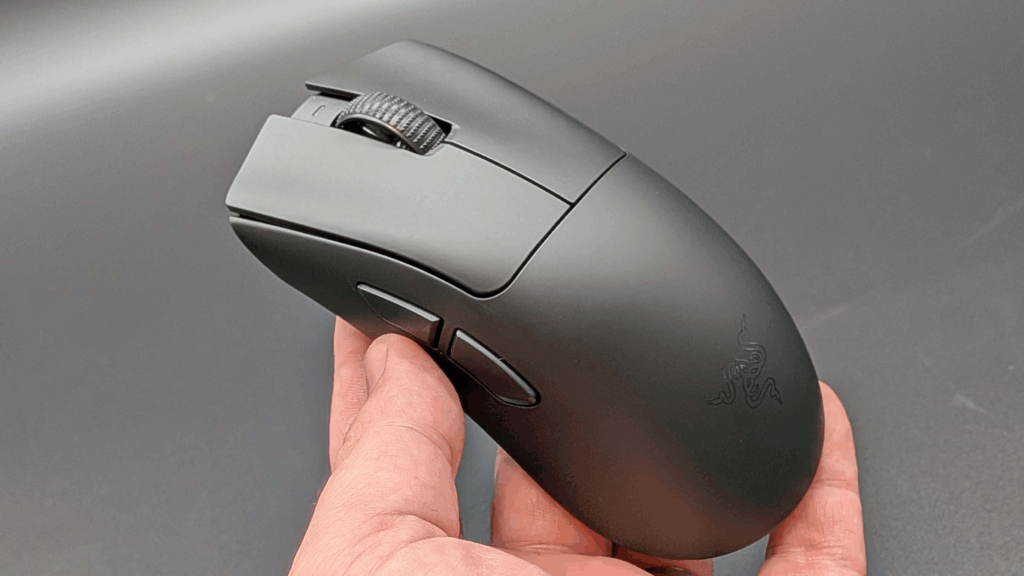
The DeathAdder V4 Pro retains its iconic ergonomic shape, long favored by FPS and competitive gamers. Its 2.7-inch width slightly exceeds the Razer Viper V3 Pro, allowing for a more relaxed grip that accommodates larger hands and palm grip users. The matte finish and sculpted curves offer a secure hold—even during intense matches.
The white model offers a striking aesthetic with its clean look and visible Sneki logo, though it may require more frequent cleaning. With no RGB elements, the design leans minimalistic.
Controls & Performance
Razer sticks to the essentials: two main clicks, two side buttons, and a scroll wheel. All but the side buttons use optical switches. The scroll wheel is precise, though its optical nature won’t transform everyday tasks.
The standout here is the side button design—chunky, clearly defined, and easy to press during fast-paced play. The major flaw? The DPI button is still underneath the mouse, which limits on-the-fly sensitivity adjustments.
In gameplay, tracking was consistently accurate across FPS titles like Apex Legends and CS2. The mouse’s light weight, solid grip, and top-tier sensor made aiming fluid and responsive.
Sensor & Switches
Razer’s new Focus Pro 45K sensor is a significant step up, offering 45,000 DPI and 900 IPS—beating out even Logitech’s Superlight 2 DEX (44,000 DPI, 888 IPS). While the human eye may not perceive all of these technical gains, elite players will appreciate the flawless 1:1 tracking and responsiveness.
The Gen 4 optical switches are lightning-fast but produce noticeably louder, hollower clicks than Logitech’s softer, more tactile buttons. Esports players will prioritize speed, but everyday users may find the sound fatiguing over time.
Connectivity & Software
The V4 Pro includes Razer’s redesigned 8,000Hz HyperPolling wireless receiver. This weighted USB-C dome improves reception and offers customizable LEDs for real-time feedback on battery, DPI, and more. It’s a meaningful upgrade—though the cable defeats the “clean desk” appeal of wireless setups.
There’s no Bluetooth option, which is expected for an esports-focused product.
Synapse software remains powerful but not frictionless. Setup requires a separate firmware tool (not integrated into Synapse), and this process is less streamlined than competitors like Logitech G Hub. Still, once configured, the software allows for deep customization: DPI stages, lift-off distance, asymmetric cut-off, and motion sync.
The most impressive tool? A rotation calibration feature that ensures horizontal accuracy even if you naturally angle your mouse during use.
Battery Life
Battery life exceeds expectations. Razer estimates 150 hours at 1,000Hz, but real-world testing showed 32 hours of use with only 12% battery consumed—suggesting better-than-expected endurance. At 8,000Hz, that drops to around 22 hours, but that’s still enough for multiple sessions between charges.
Comparison: DeathAdder V4 Pro vs Competitors
| Model | Price | Weight | DPI / IPS | Polling Rate | Battery Life |
|---|---|---|---|---|---|
| Razer DeathAdder V4 Pro | $169.99 | 56g | 45K / 900 | 8,000Hz | 150h @1KHz / 22h @8KHz |
| Logitech G Pro X Superlight 2 DEX | $159.99 | 60g | 44K / 888 | 4,000Hz | ~110h |
| Razer Viper V3 Pro | $159.99 | 54g | Same sensor | 4,000Hz | Similar |
The DeathAdder V4 Pro leads in sensor specs and polling rate but trails Logitech slightly in click feel and software elegance.
Who Should Buy It?
Buy if:
- You’re a competitive gamer seeking elite-level speed and accuracy
- You value lightweight, ergonomic mice with minimal distractions
- You want advanced polling and tracking tech out of the box
Skip if:
- You mostly play casually or single-player games
- You prefer quiet, tactile clicks over sheer speed
- You dislike underside DPI controls or complicated setup processes
For casual users, the Keychron M7 8K at $69.99 provides similar aesthetics and comfort without the esports-level tech (and price).
Ratings
| Category | Score |
|---|---|
| Comfort | 4 / 5 |
| Speed | 5 / 5 |
| Programmability | 4 / 5 |
| Connectivity | 5 / 5 |
| Battery Life | 4 / 5 |
Conclusion
The Razer DeathAdder V4 Pro is a top-tier mouse built for elite competitive play. It’s fast, light, ergonomic, and packed with cutting-edge tech. While casual players may not benefit from everything it offers, serious gamers will find few better options in 2025. Razer has reasserted its dominance in the esports mouse space.
Also Read : 5 Cheap Gaming Microphones You Can Grab