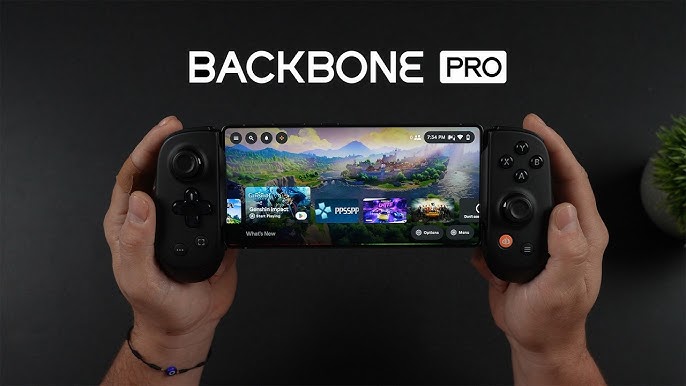
The Backbone Pro is a flexible mobile controller that delivers satisfying physical controls for Android and iOS gaming, whether connected directly or used wirelessly via Bluetooth.
Pros
- Supports physical USB-C and Bluetooth connections
- Responsive controls
- Comfortable design with full-size analog sticks
- Programmable rear buttons
- Compact and portable
Cons
- Lighter feel than a full-size controller
- Some app features require a paid subscription
- No haptic feedback
Overview
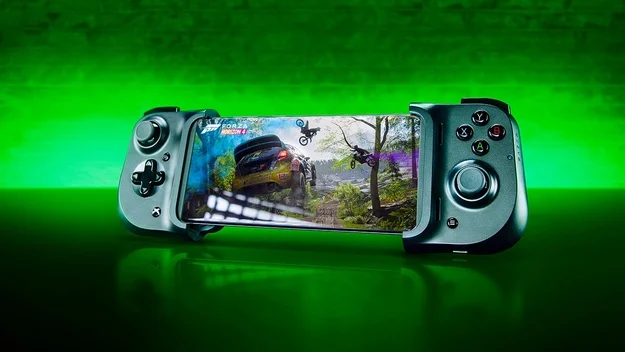
If you want physical controls for mobile gaming, clamp-on controllers are the easiest solution. Bluetooth gamepads work too, but they require extra accessories to hold your phone. The Backbone Pro combines both approaches. It’s a snap-on controller like the Backbone One but adds Bluetooth support for use with phones, tablets, PCs, and compatible smart TVs.
Although pricier than typical mobile controllers, it offers solid performance and excellent comfort. It still isn’t as substantial as the full-size Razer Kishi Ultra, and several software features are locked behind a yearly Backbone+ subscription. Even so, it remains a strong choice for players who want one controller for both mobile and wireless use.
Design and Controls
The Backbone Pro is slightly larger than the original Backbone One, measuring 4.1 by 7 by 1.4 inches. It stays compact enough to carry easily, while its rounded, thicker grips improve comfort. At just over 7 ounces without the rubber inserts, it feels light because it lacks vibration motors, but build quality remains sturdy.
The control scheme mirrors an Xbox layout:
- Offset full-size analog sticks
- A traditional D-pad
- A/B/X/Y face buttons
- Shoulder bumpers and analog triggers
- System buttons for Start, Select, Capture, and Backbone/Guide
The triggers use magnetic Hall effect sensors, though the pull distance is shorter than on full-size controllers. The buttons are smaller than those on console controllers but still clicky and accurate.
A USB-C port sits on the right grip for charging and passthrough power, and a headphone jack on the left enables wired audio. A dedicated pairing button makes Bluetooth setup simple.
The controller supports nearly any USB-C device, including most Android phones and iPhone 15 models. It fits devices between 3.4 and 7 inches long, even large models like the Galaxy S25 Ultra. If you’re using a small tablet or iPad mini, the bigger Razer Kishi Ultra may be a better match.
Two sets of rubber inserts help secure various phone sizes. Once connected, your phone detects the controller and launches the Backbone app.
Wireless Use and Battery Life
Wireless pairing is straightforward. After pressing the pairing button, the Backbone Pro connects through standard Bluetooth menus. It works with PCs, phones, tablets, and TVs that support XInput controllers. When used wirelessly with a phone, the Backbone app does not fully function, and you won’t get any haptic feedback.
Backbone states that the controller lasts up to 40 hours on Bluetooth before needing a recharge.
Software and Backbone+ Subscription
The Backbone Pro works out of the box, but the Backbone app is needed for firmware updates and basic configuration such as remapping and image capture. When the phone is docked, pressing the Backbone button opens the app.
A $39.99 per year Backbone+ subscription unlocks additional features, including:
- Game launcher for installed and cloud gaming apps
- Up to 1080p60 video capture with cloud storage
- Twitch streaming tools
- Voice chat with other subscribers
- Early access to a retro game emulator for iPhone
While these features are useful, many users may feel they should be included with the hardware, especially since alternatives like Discord or RetroArch offer similar capabilities for free.
Gaming Performance
The Backbone Pro worked smoothly with Steam and most PC games, and it performed reliably with the Xbox app except for occasional input issues in specific titles.
The full-size analog sticks deliver accurate tracking and feel similar to standard console controllers. Buttons, bumpers, and triggers offer consistent feedback, though the short trigger pull makes certain racing games slightly harder to control precisely.
During testing with Monster Hunter Wilds, Palworld, and other action-heavy titles, the controller offered precise movement and targeting. Face buttons, despite being smaller, were easy to differentiate during gameplay.
Final Verdict
The Backbone Pro is a strong snap-on mobile controller with responsive controls, a comfortable form factor, and both wired and wireless functionality. Its compact build makes it easy to carry, though it lacks the weight and premium feel of larger gamepads. If you want a more console-like experience, the Razer Kishi Ultra is a better option.
Still, the Backbone Pro stands out for its versatility and remains an excellent choice for mobile and PC gamers who want a single controller that works across multiple devices.
Rating: 4.0 – Excellent