
Razer is expanding its Basilisk lineup with the Basilisk X Hyperspeed, taking elements from the original’s design and converting them into a wireless package at a reduced $59 price point. That puts this mouse in impressive territory—competing with the best gaming mice on both price and performance while many competitors remain tethered to cables.
The dual-mode wireless offering here is notable. You get both 2.4GHz and Bluetooth LE connections, similar to what Corsair offers with the Harpoon RGB Wireless at $49. But Razer brings its own twist to the formula.
Design and Build
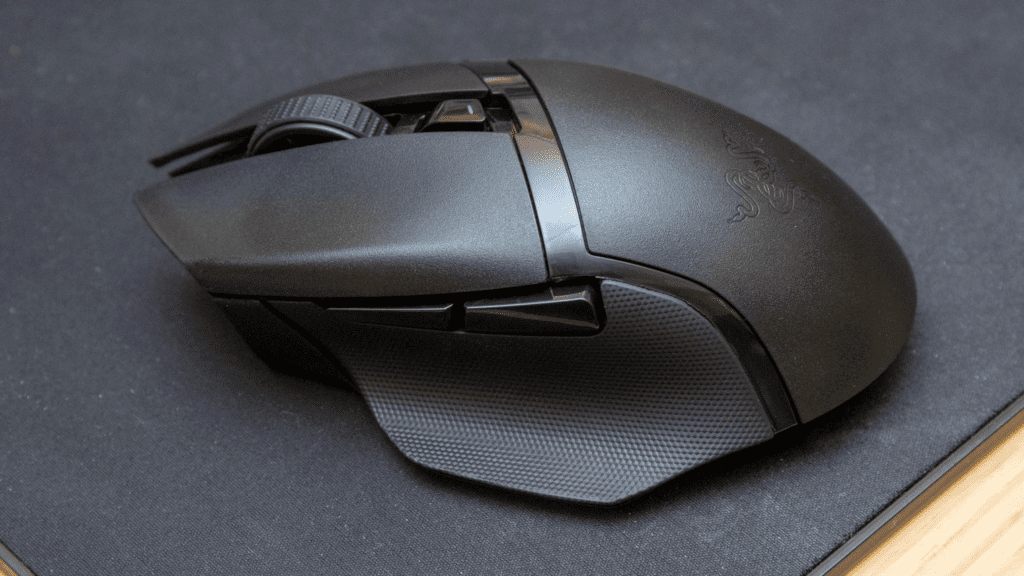
The Basilisk X Hyperspeed inherits the original Basilisk’s shape—sweeping thumb grip, angular front, sloping surface—but simplifies things considerably. The grip design is more basic. Two thumb buttons sit on the left side. The notched scroll wheel lacks any special adjustments. RGB lighting is gone entirely, and the DPI switch features just a single indicator light.
Razer’s mechanical switches handle the clicks, rated for 50 million actuations. They’re satisfyingly clicky with consistent feel, and the thumb buttons avoid any mushiness. The design also borrows some visual cues from the Logitech G502 Hero, with glossy stripes cutting across the matte black plastic.
Measurements come in at 130mm x 60mm x 42mm with a weight of 83g before adding the AA battery. With the battery installed, expect just over 100g. The palm rest removes to reveal the battery cavity and USB dongle storage. There’s actually room in there for custom weights, which makes it a shame Razer didn’t include any.
Razer Synapse handles customization for DPI settings and button remapping, though the limited button count means most users will probably stick with defaults.
Underneath sits the Razer 5G Advanced optical sensor offering up to 16,000 DPI, tracking speeds to 450 IPS, and acceleration handling up to 40G.
Performance
To put it simply—excellent. The Basilisk X Hyperspeed delivers the high-end tracking you’d expect from a quality gaming mouse, with capabilities matching the twitch reflexes of elite players.
Wireless gaming mice have come a long way, and any lingering concerns should disappear here. The 2.4GHz connection shows no noticeable latency even while gaming above 100 frames per second. The mouse wakes from sleep via both clicks and movement, preventing those awkward moments of accidentally shooting an NPC right after a long conversation.
Playing through the second half of Outer Worlds, the Basilisk X never struggled to snap aim onto targets. Tracking stayed consistent whether making small adjustments on distant enemies or whipping around to face threats from behind.
Battery life isn’t remotely an issue. Razer claims 285 hours via HyperSpeed Wireless and 450 hours on Bluetooth from a single AA battery. After extensive testing, the battery barely dropped a few percentage points.
The Bluetooth connection also makes this mouse viable for portable use. Pair it with a laptop, leave the USB dongle plugged into your gaming PC at home, and you’ve got flexibility. Tracking smoothness decreases on Bluetooth, but the convenience factor is real.
Who Should Buy It
Dual-purpose users. Bluetooth for travel and HyperSpeed at home means you don’t need to worry about losing the dongle when taking the mouse out.
Anyone wanting wireless without battery anxiety. An hour of daily gaming gives you roughly nine months before needing a new battery. Bluetooth workday use stretches to about eleven weeks.
Value seekers. For the performance, design, and battery life on offer, the price is genuinely impressive.
Who Should Skip It
Customization enthusiasts. This is basically the bare minimum for a gaming mouse. No weight tuning, limited buttons for macros or fancy bindings.
Original Basilisk fans. The tunable scroll wheel, RGB, and third thumb button are gone—traded for affordability.
Anyone avoiding gamer aesthetics. While impressively lacking Razer’s usual bright green, the sharp angles and mixed matte/glossy plastics still scream gaming mouse.