It’s been almost five years since the launch of the PlayStation 5, and while it’s still one of the most powerful consoles out there, many players have noticed it tends to slow down over time. If your PS5 has started lagging, overheating, or crashing more often, don’t worry — a little maintenance and optimization can bring it back to life.
Here are some essential PS5 tips and maintenance tricks to keep your console running as smoothly as the day you unboxed it.
1. Clean the Vents and Fan Regularly
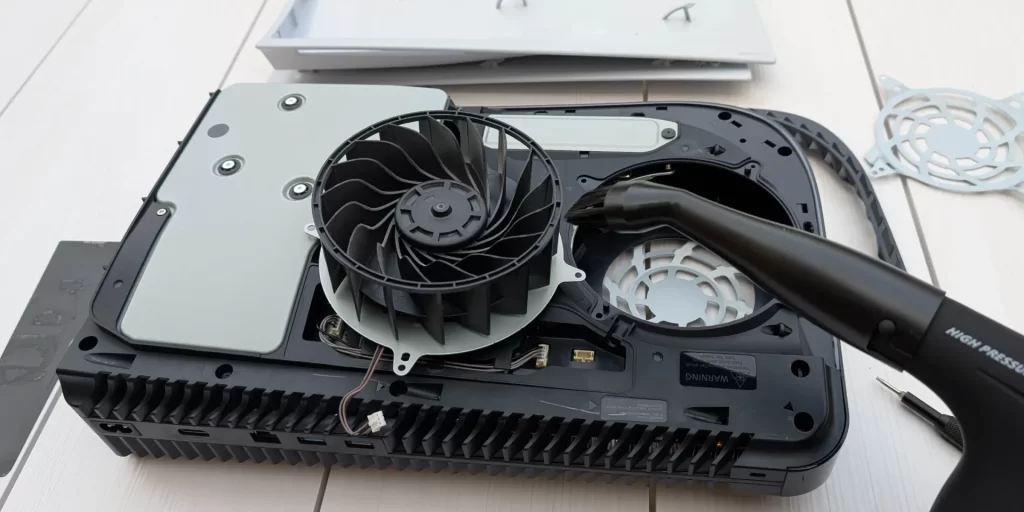
One of the biggest reasons the PS5 slows down is dust buildup inside the fan and vents. Over time, this causes overheating, loud fan noise, and performance drops.
- The PS5’s side plates can be easily removed by hand, making cleaning simple.
- Use a soft cloth and earbuds to gently wipe away dust.
- For deeper cleaning, use a pressurized air can, but never blow directly on the fan while it’s attached. Instead, unplug the fan connector and clean it separately.
Pro tip: Clean your PS5’s vents once every month to avoid heating issues.
ALSO READ: Xbox Handheld Consoles: ROG Xbox Ally & Ally X – Everything You Need to Know
2. Keep the Console in a Ventilated Area
Even with a clean fan, poor airflow can slow your PS5 down.
- Always place the console in a cool, open space with plenty of breathing room.
- Avoid placing it against walls, inside tight cabinets, or near heat sources.
- Never keep it where there are crumbs, loose paint chips, or dust — the system will suck it all in and clog up.
A well-ventilated PS5 runs cooler, quieter, and faster.
3. Rebuild the Database

If you’ve been facing game crashes, laggy menus, or slow loading, it might be a software issue. One of the best solutions is to rebuild the PS5 database once a year.
Here’s how:
- Turn Off your PS5 completely.
- Boot into Safe Mode by holding the power button until you hear two beeps.
- Connect your DualSense controller via USB and press the PS button.
- Select Option 5: Rebuild Database.
- Wait for the scan to finish (it doesn’t delete your games or saves).
- Restart your PS5 — you’ll notice smoother performance immediately.
Rebuilding the database organizes system files and reduces lag.
4. Free Up Storage Space
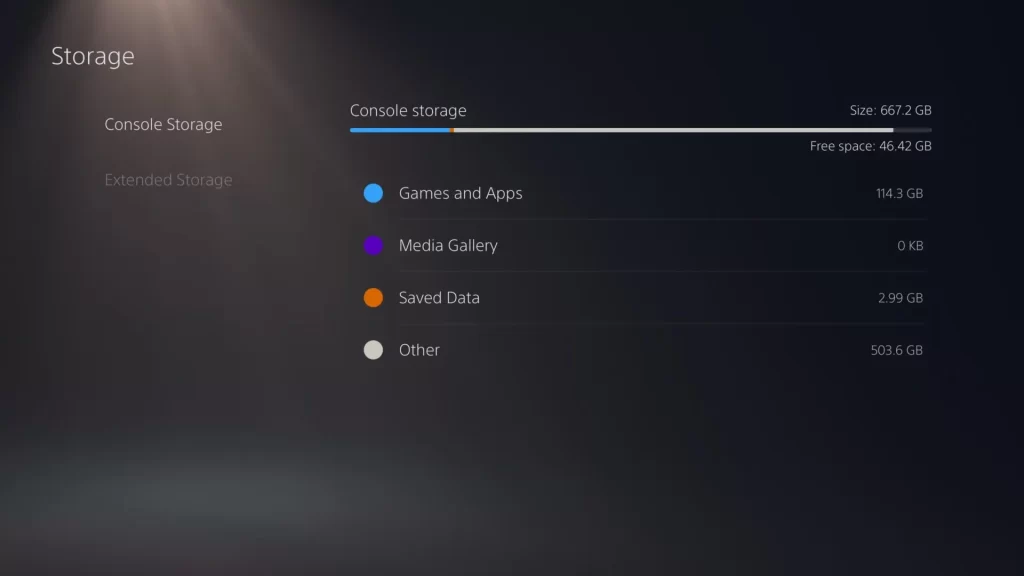
A full SSD can slow down the PS5 dramatically. The console ships with a 1TB SSD, but modern games eat up that space fast.
To keep your PS5 running smoothly:
- Always leave at least 100GB of free space.
- Delete games you don’t play regularly.
- Store PS4 games on an external hard drive or USB drive.
- Disable automatic trophy video saving (Settings > Saved Data & Game/App Settings > Save Trophy Videos).
Think of it as giving your console room to breathe.
5. Shut It Down Properly

Believe it or not, many issues happen because people don’t turn off their PS5 the right way.
- Always close games and apps before shutting it down.
- Use the system’s power menu instead of pulling the plug.
- Avoid leaving it on Rest Mode for weeks without restarting.
Treat your PS5 like a high-end device, not a toy — it’ll last longer.
Summary
If your PS5 is running slow, it doesn’t mean it’s broken. In most cases, regular cleaning, proper ventilation, freeing up storage, and rebuilding the database can make a huge difference.
By following these PS5 maintenance tips, you’ll keep your console performing at its peak, prevent lagging issues, and extend its lifespan — whether you own the PS5 Standard, Slim, or Pro.
Take care of your PlayStation 5, and it’ll keep delivering the fast, smooth gaming experience you love.